
YOUR INSURANCE RECEIPTS
Available Instantly
No waiting. No paper. No separate receipt request.
After your massage therapy, osteopathy, acupuncture, naturopathy or other eligible treatment at Vibrations Om, your receipt will be automatically available as soon as your appointment is checked out and paid.
You no longer need to wait for your therapist or our reception team to prepare and email a separate insurance receipt.
Your Fresha invoice contains all the information required to submit your treatment to your insurance provider, including your therapist’s name and registration number, treatment details, clinic information, fees, taxes and payment information.
In most cases, your receipt will already be in your inbox before you even leave the studio.
How to Access Your Receipt
After your appointment:
1. Open the email from Vibrations Om sent by Fresha
2. Click “View Invoice”
3. Use this invoice for your insurance claim
You can refer to the information directly on the invoice when completing your insurer's online claim, or download the invoice if your insurer asks you to upload a copy.
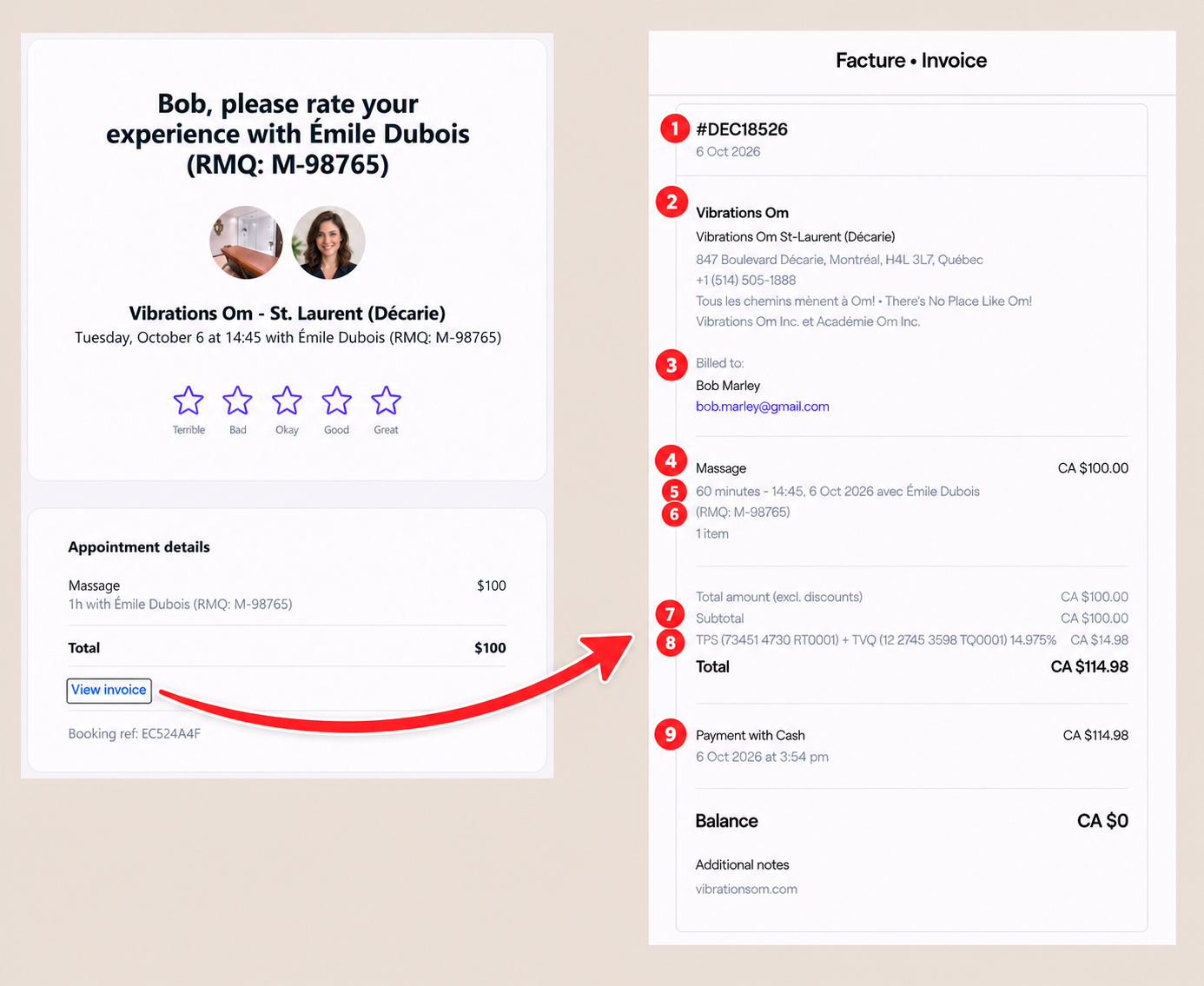
Where Can I Find the Information I Need?
We recommend placing numbered markers ①–⑨ directly on the invoice. The explanation underneath could read:
① Invoice number and date
At the top of the invoice you will find the unique invoice number and the date the invoice was issued.
② Clinic name and address
This section identifies the location where you received your treatment, including:
Vibrations Om
The specific studio location
Full clinic address
Telephone number
Your insurance provider may ask for the address where the treatment took place.
③ Client information
Under “Billed to”, you will find your name and email address.
Please make sure the name on your Fresha account corresponds to the name you use with your insurance provider.
④ Type of treatment
Your treatment appears directly on the invoice—for example:
Massage
Osteopathy
Acupuncture
This identifies the professional service you received.
⑤ Appointment date, time and duration
Directly underneath the treatment you will find details such as:
60 minutes – 14:45, 6 Oct 2026
This confirms the date of treatment and duration of your appointment.
⑥ Therapist, association and registration number
On the same line you will find the name of the professional who provided your treatment, the right below the name of their professional association and their registration number with that assocation, for example:
Émilie Dubois
(RMQ: M-98765)
Depending on your practitioner, you may see a registration number from associations such as AMQ, RMQ, RMPQ, FQM, RITMA, or another recognized professional association.
This is normally the number your insurer is asking for when they request the therapist's licence, permit, membership or registration number.
⑦ Cost of the treatment before tax
The invoice shows the price of the professional service and the subtotal before taxes.
If your insurer asks for the treatment cost before tax, use the Subtotal amount.
⑧ Taxes and tax registration numbers
Where applicable, the invoice separately identifies:
GST/TPS
QST/TVQ
Our applicable tax registration numbers are also displayed directly on the invoice.
⑨ Total paid and payment confirmation
The Total shows the complete amount charged, including applicable taxes.
Further down, the invoice also shows the payment and the remaining balance.
When the invoice displays:
Balance: CA $0
this confirms that the invoice has been paid in full.
FAQ
Common Professional Associations
If your insurance provider asks for the full name of your therapist’s or practitioner’s professional association, here are some of the abbreviations you may see on your receipt:
RMQ — Regroupement des massothérapeutes du Québec
RMPQ — Réseau des massothérapeutes professionnels du Québec
FQM — Fédération québécoise des massothérapeutes agréés
RITMA — Regroupement des intervenants et thérapeutes en médecine alternative
ANM — Association nationale des massothérapeutes
ACAM — Association Can-American des massothérapeutes
ANPQ — Association des Naturopathes Professionnels du Québec
AQTN — Association québécoise des thérapeutes naturels
ACTMD — Association canadienne des thérapeutes en médecines douces
OSTCAN-QC — Osteopathy Canada – Quebec
Not sure which association to enter?
Look directly beside or underneath your practitioner’s name on your invoice. For example, if your receipt shows RMQ: M-98765, enter RMQ as the association and M-98765 as the practitioner’s membership or registration number.
I Can't Find My Receipt
Your receipt is sent automatically after your appointment is checked out, so there is normally no need to request one separately.
If you cannot find it:
Search your inbox for “Thank you for visiting Vibrations Om”.
Search for “Fresha” or “Vibrations Om”.
Check your Spam, Junk or Promotions folders.
Make sure you are checking the email address associated with your Fresha account.
Still can't find it? Contact us and we'll be happy to help.
Why We Changed Our Receipt System
Previously, insurance receipts often had to be prepared separately after your appointment. Depending on the practitioner and their professional association, this could involve paper receipts or different electronic receipt platforms.
Our new system makes things much simpler.
Your invoice is now:
✓ Automatic — generated when your appointment is completed
✓ Immediate — normally available within moments
✓ Consistent — the same clear format regardless of your practitioner
✓ Accessible — available directly from your email
✓ Complete — treatment, practitioner, clinic, pricing, tax and payment information are all together in one place
✓ Environmentally friendly — no paper receipt required
That means less paperwork for our practitioners—and, more importantly, no waiting for you.
A Note About Insurance Coverage
Every insurance company and policy can have its own reimbursement rules. Your Vibrations Om invoice contains the treatment and practitioner information generally required to submit a claim, but coverage and acceptance are ultimately determined by your insurance provider.
If your insurer requests additional information that you cannot locate on your invoice, please contact us and we will be happy to assist.